|
Contents UNESCO World
Heritage Site Grimeton Radio The Software
Defined Receiver: SAQrx First Steps
Preparing for Reception Listen to World Heritage Grimeton
Radio (SAQ)
Grimeton
Radio is the last transmitter in the world generating rf
power without any electronic parts. No tubes, no semiconductors, only an
engine driving an AC generator. Receiving Grimeton
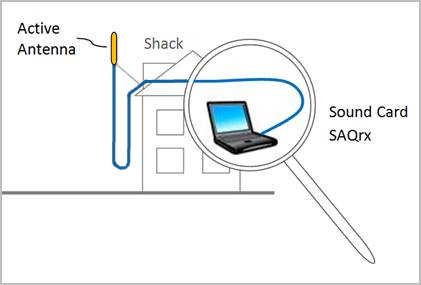
Radio (SAQ) on 17.2 kHz is as easy as the sketch below depicts:
You only
need to connect an active antenna (often called an e-field probe) to the sound card of
your PC and to install SAQrx, a software defined VLF receiver by SM6LKM for the
VLF band. UNESCO World Heritage Site Grimeton Radio
(SAQ)
Grimeton
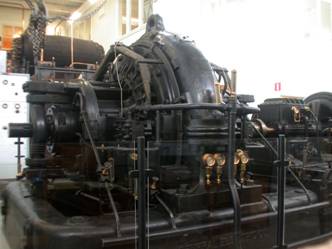
Radio (SAQ) is the last transmitter in the world preserved that generates VLF
radio frequencies with an alternating current generator (alternator), i. e. a machine that nowadays is only known to produce AC
current with frequencies below 100 Hz – electric power. After its inventor, a
Swedish engineer, this type of transmitter is called Alexanderson Alternator
(see Fig. 2 below).
From the late 1860s to 1930 about 1.2 million
unemployed people left Sweden to seek good fortune in the big cities of
America. Grimeton Radio with the call sign SAQ was
built in the 1920s to maintain communication between the Swedish emigrants
and their home country. For years the transmitter was operated as a
transatlantic telegraphy link to the RCA transmitter Radio Central in Long
Island, New York, USA. With the
advent of tube transmitters and rising knowledge of worldwide propagation of
short waves, VLF transmitters became less important. Grimeton
Radio was adopted by the Swedish navy to communicate with submarines for the
next decades and so could survive until the end of the 20th
century. It was finally put out of service in the year 1995 – full operative
with 200 kW output and the last of its kind in the world. As early
as 1996, Grimeton Radio was declared to be a national
heritage of Sweden and in the year 2004 it became a UNESCO World Heritage
Site.
Grimeton
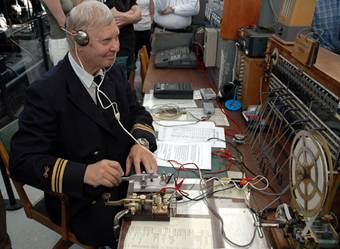
Radio (SAQ) is activated in cw transmission by the Alexanderson Society at least two times
a year, at the beginning of July around the Alexanderson Day and on christmas eve (look out for skeds). These are
the rare moments, when US swls and hams have the
opportunity to prove that the old lady in Sweden still can be copied at the
east coast of the USA. Reports (from everybody, not only US hams!) are
rewarded by qsl cards. Join the
YouTube channel of the Alexanderson Association
and decide for yourself if it might be an exciting experience to listen to Grimeton Radio on 17.2 kHz. The Antenna
Don’t
waste much thought on creating a resonant antenna – the half wave length at
17.2 kHz is 8700 meters, much too long for your garden. And don’t think your antenna is meant to
last forever with a King Kong approved fastening and measures for lightning
protection. You just need the antenna
for half an hour two times a year, so clamp a wooden holder for an active antenna (e-field probe) into your shack window (see Fig. 1).
Try the PA0RDT mini whip – it comes ready to use
from a friendly Dutch radio amateur and is very tiny. If you
want to build a simple antenna by your own, try this example for a homebrew active antenna. Antennas
successfully used by US stations reach from a 4 foot loop portable on Port
Mahon Beach (Dover, Delaware) to a 100 meter long zepp
at 22 meters height at Marietta, Ohio. Find your own solution and don’t give
up after the first try! The Software Defined Receiver: SAQrx
SAQrx
is a sound card based receiver software by Johan Bodin, SM6LKM, originally covering the frequency band from
0-22 kHz and running under Microsoft Windows. It requires a sound card
capable of full duplex at 44/48 kHz sampling rate (satisfied by most of the
onboard PC sound cards). Roland Fröhlich, a mathematician and active long-/shortwave
listener, extended the capabilities of SAQrx with
lots of convenient features. You can now use sound cards up to 192 kHz
sampling rate, change between modes (CW, SSB, AM),
store and play soundfiles and much more. Please
read his introduction to SAQrx to learn what options are included. Once you
have unzipped the zip file and started SAQrx*.exe, you will have a panoramic
view of the frequency band decoded by your sound card (see screenshot
below). Press [Help] to learn how to tune the receiver and change the
bandwidth. You can download the files
needed from Roland’s web site (version 0.94) or from here: latest version 0.98.
First
Steps Preparing for Reception of SAQ
For a
first test, you should try to find a military transmission somewhere in the
passband of SAQrx. In Europe, there are several
navy stations between 16 kHz and 48 kHz transmitting a constant MSK signal.
Even at parts of the spectrum being quiet on other days,
you may discover data transmissions. From time to time, there is a two-tone FSK
signal on 18.1 kHz, transmitted by RDL, a Russian
navy station or a time signal on 23 kHz or 25 kHz (RJH).
|